Typography, AI, and the Future of Design Tools: A Conversation with Typogram
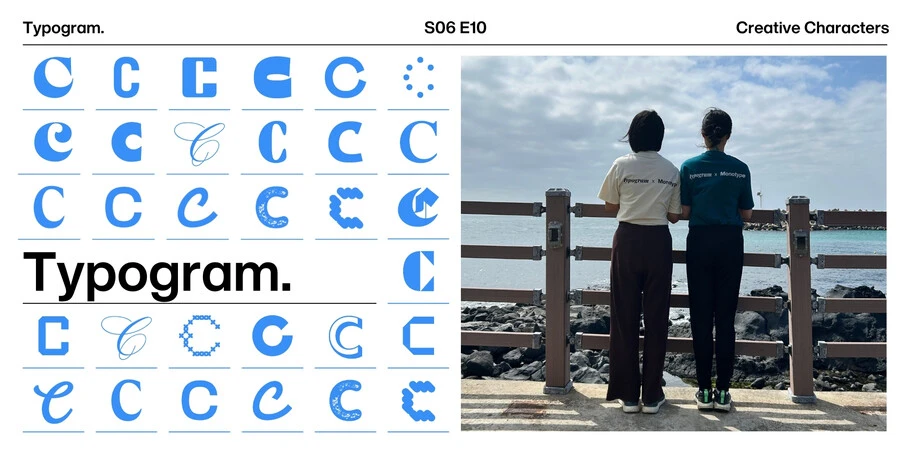
We’re excited to be featured on Monotype’s Creative Characters podcast, hosted by Dan Rhatigan and Kadley Gosselin. Listen to the episode or read our interview below.To celebrate our launch, we’re giving away three mystery fonts from Monotype’s library—curious? Take a spin at typogram.co/launch 🎁.
About the Founders
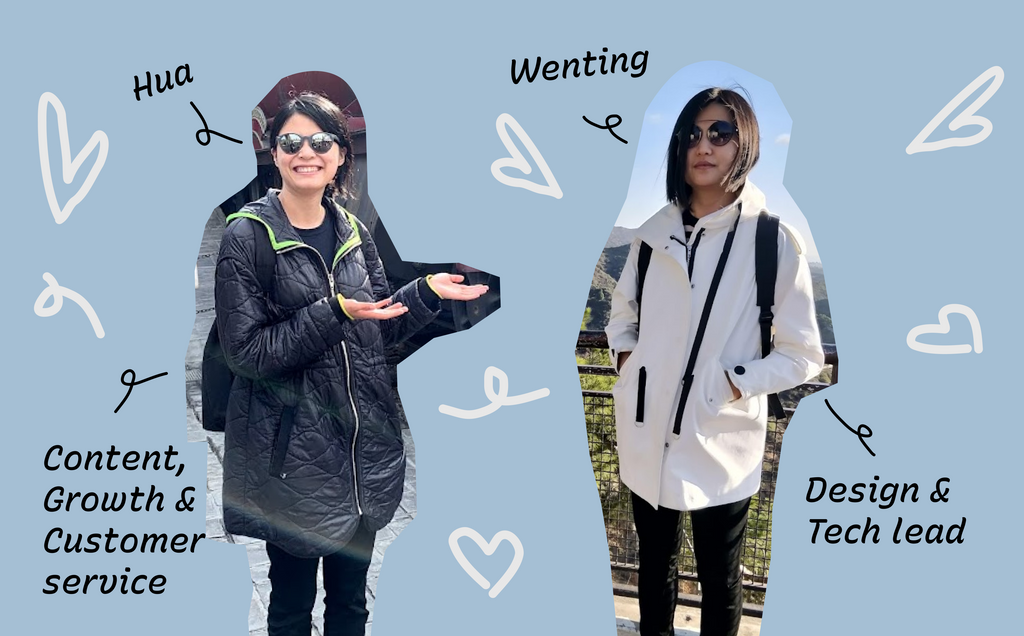
Hua Shu and Wenting Zhang are both experienced designers and educators. Hua Shu studied at Cooper Union and earned an MFA in graphic design from Yale. Wenting Zhang did UX design at Adobe, working on Adobe Fonts, and earned an MFA in design from Parsons. They came together to create a startup and have developed two design tools: Typogram Branding, which helps non-designers develop branding systems, and Typogram Studio, a typography-focused tool that's geared towards seasoned designers.
Typogram's Beginnings
Dan Rhatigan: Hua, can you tell us about who you are and how you got excited about typography?
Hua Shu: I'm a product designer based in New York City. Most of the time, I work on Typogram. Typogram is a company that Wenting and I started together, and currently, we have two tools. One is a brand design tool called Typogram for non-designers, and the other one is a typography design tool for designers called Typogram Studio, which we just launched recently. I also teach at Parsons School of Design. I love typography. Since a young age, I studied Chinese calligraphy. By the way, I really, really fell in love with typography in the US was when I moved from Maryland to New York City. So once I moved to New York City, I was so impressed by the creative community here and also by all the varieties of typefaces I see on the street. So that's how I came to love type.
Dan Rhatigan: For sure. Wenting, you and I have had the pleasure of knowing each other for many years, but our audience may not be as familiar with you. Can you tell us a little bit about who you are and what got you excited about typography?
Wenting Zhang: sure. I'm Wenting Zhang, and I am the co-founder of Typogram. Previously, I got the pleasure to work with Dan at Adobe Fonts. That was my last job before jumping into this full entrepreneurship saying, "How do I get into type?" I got into type in New York City, similar to Hua, and it kind of started with a negative note because I was in my graduate school in design and technology at Parsons and in one of the critique, and I got feedback that my typography not so great. And when the teacher asked me what font I'm using and where I got them, I said, "This is from dafont.com". And, I quickly learned that's a big no, and, I learned about quality of fonts, licensing. And I'm always kind of a overachiever. When some- someone told me like, "Oh, you're not great on, at this," I try to overcompensate, and I definitely- Kind of dive into typography in a way to prove myself that I can be good at something I'm not great at to begin with. And I kind of become more and more into type. That got me into a lot of side projects, including Underline.js, which is a side project that I did following Medium Design's underline pursuit, and I thought that was really cool, and did extra on that. And that kind of lead me to the world of typography at Adobe Typekit and Adobe Fonts, and that's where the story officially began, was type.
How They Met
Dan Rhatigan: How did the two of you meet and start working together, and what was the path that then led to, the two of you starting Typogram?
Wenting Zhang: So we met at New York City at Cooper Union at the Type@Cooper. That's where we first met, at a lecture, and later on that kind of sparkle a friendship and collaboration. We start working on, like, small side projects together, and once it leads to another, it's getting bigger and bigger. When I have this idea about Typogram, at the time it was still like a side project thing, and I told Hua, and Hua was at Yale School of Art, and she got us into the entrepreneur program at Yale, and that's where kind of Typogram is budding from the land of New Haven.
Creative Side Projects
Dan Rhatigan: I see. So that, I know that you have tinkered away at some side projects over the years that I've seen. Hua, were you similarly always pursuing little sort of bits of curiosity and side projects and side gigs along the way?
Hua Shu: Yeah, I would say so. I always have a lot of interests, so I was always doing something. New York City just has so many different things going on in term- like, for people who are interested in design, typeface design. So yeah, I was always, I was doing some side projects. I was especially interested in learning how to code, so a lot of it was revolved around that.
Dan Rhatigan: I think side projects tend to really blossom around people who are passionate and curious about a lot of things. [laughs] I know that I've built up my own collection of them. Of these little side quests, do you have a particular favorite that maybe did not materialize into anything, but at least really caught your attention in a sort of profound way at the time?
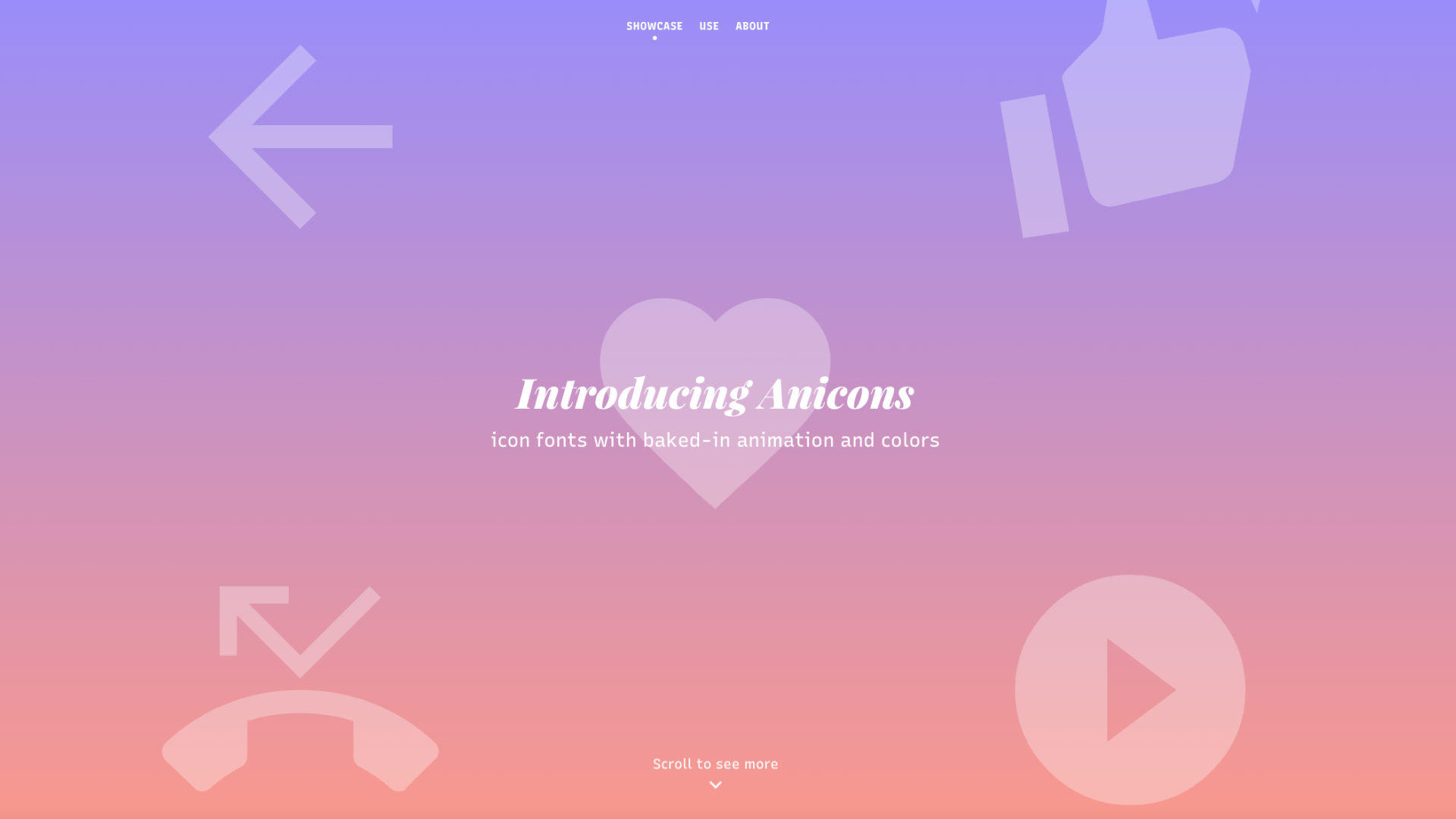
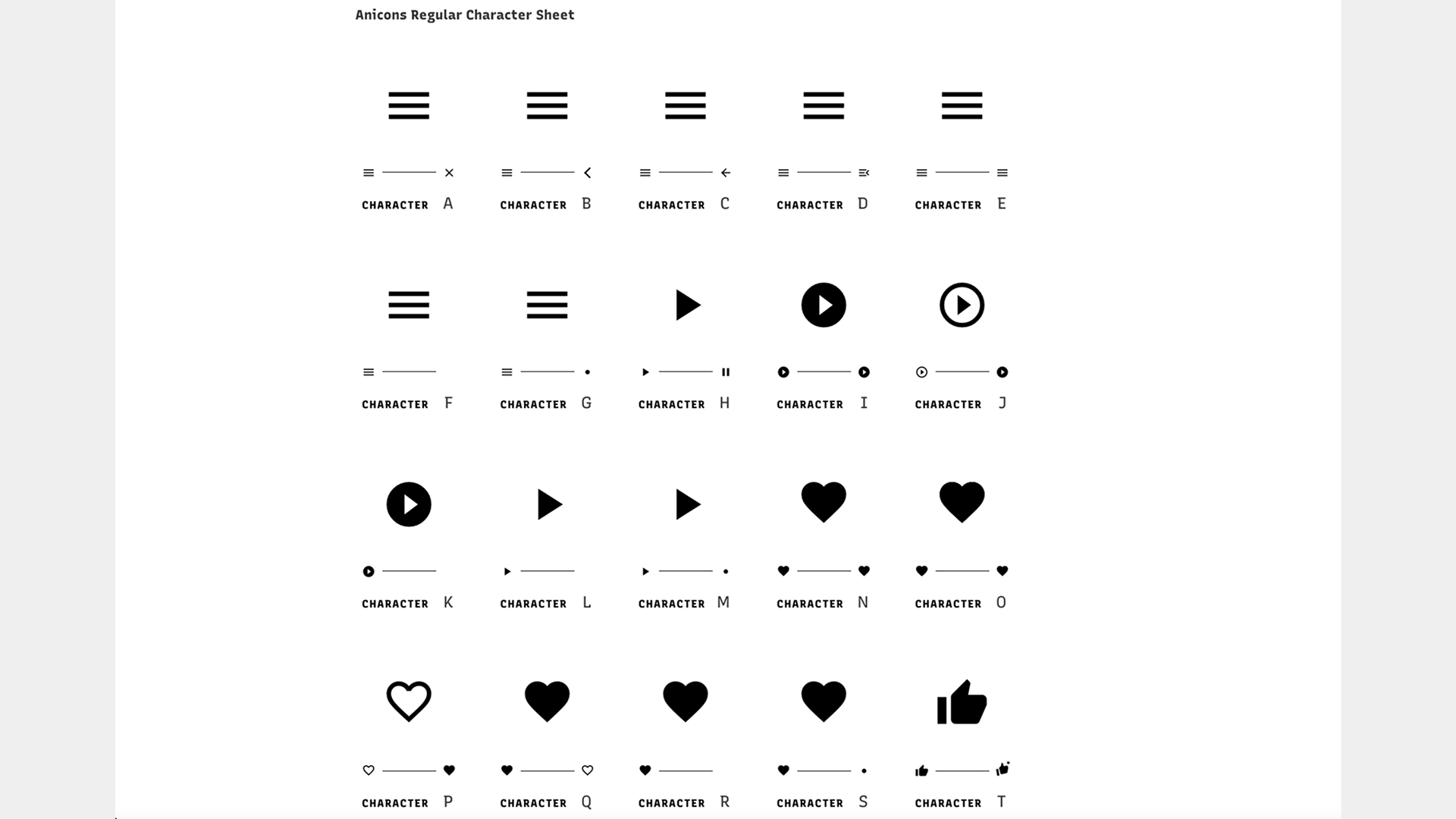
Wenting Zhang: I can think of one that I did with Hua. It's called Anicons. It's a abbreviated term for animated icons. It's a icon font that has variable font technology to create a timeline access so that you can animate an icon from stage one to stage two. Like, for example, like, a hamburger icon animated to a delete or close icon. I thought that was pretty cool because it's using variable fonts in a unconventional way, and it is packing icon fonts in an unconventional way as well, but it doesn't fit into, not materialize into anything. Not to brag, but that was, quoted or referenced by Figma Design when they implement their variable font features.
Wenting Zhang: Yeah, both Hua and I teach, and I think one of the, important message I want to get across to my students is do side project and, and publish them as quickly as possible. Don't be perfect. When you put things out in the world, you get results that you are not expected. Not often necessarily success or fame or, like, going viral, but you put into, in front of people, and people is gonna tell you things that you cannot materialize in your head, and that's really important, and who knows? Maybe it will go viral. A few of my project went viral and got me jobs. So that's another thing I keep trying to tell everybody in my class that put yourself out there. Opportunity may shows up,? Like, I got into Typekit, and I didn't even have a proper interview. I just got the job because a side project of mine.
Hua Shu: Yeah, totally. I used to always make zines as well because I think it really allows you to have a place to kind of showcase, like, all the creative things you can do with the compositions and then with typefaces. So yeah, whenever I had job interviews for a graphic design position, I would always bring those, and people would love to see them. I actually even got an offer once to trade them with the interviewer, which I think is pretty cool. There's definitely a lot of value in terms of, like, creating your own side project, and I think it's a huge value no matter what stage of designer you're in. And also, it's even more awesome if you can try to actively put it out in a world and then put it into people's hands.
AI's Role in Design
Dan Rhatigan: It's interesting that you both talked about how much there's overlap of creativity and technology in your background, in the side projects, the thing that you love, and that strikes me as a really hot topic in the world today. There's so many conversations happening with a new wave of technology solutions. This time, it's around the many things that fall under the AI umbrella. But I'm curious how you feel about where creativity sits alongside this developing technology, particularly around things regarding to AI. There is discourse about AI stepping into the spaces, traditionally held by individual creative energy, and I wonder if you feel if that is the case. Are you finding places to work with technology? Are you feeling your creativity threatened by the new, or if not threatened, are if, are you feeling as if your creativity may be being sidelined or shifted to a different space in the process by AI-related technology?
Wenting Zhang: My personal experience with AI is like opening a new game and enter it. In a new game, there's so many things you need to learn about the terminologies and about, skills. That's how I feel initially, and quickly, I felt as there's an enemy in the landscape. And then later on, I find, okay, maybe I, I can collaborate with this enemy. That's how I come to terms with AI, working on Typogram and also other related work. I think my creativity is both empowered by it but also sidelined or distracted by it. AI has empowered me to do coding much more efficiently and, and freely. I have this freedom that I didn't feel before AI. I was pretty good at coding, but I never felt like I can code anything.
But with AI, I had that freedom of creativity, so that was empowered by it. But then now this technology comes in to kind of disrupt my normal, mundane life of a designer, and it become a distraction sometimes to... People talk about vibe coding. The vibe can took me somewhere else unexpectedly, and there are times that I feel like I didn't enjoy that. I could have gone, you know, a place where it's much more intentional with my craftsmanship. But there are times that it was successful, so I think a land of wonder, like, like in the game, is my personal experience.
Hua Shu: Yeah, I personally also feel like AI is definitely sometimes an overwhelming topic for me. There's kind of like a love-hate relationship with it, like, as being designer, just because I think AI enables me, and many other designers would say so, too, enable you to do a lot of things that you're not normally familiar with and allow you to essentially have the skills to maybe create something that you haven't done before. But it almost feels like you have to be more of an expert of everything. Wenting and I actually were having this conversation earlier where I was just telling her that nowadays it really does feel like you have to be a lot more of a generous than before because now unavoidable AI tools everywhere, you kind of gotta bring more things to the table, and I think sometimes that can be very overwhelming.
But I also have to admit that, when it comes to designing, there are just tasks that are tedious- I love design, but there are parts of design that I don't enjoy, like those tedious tasks. So I do think in that aspect, AI is really helpful in that, like, if there's an AI tool that could somehow, like, make those tedious, not as enjoyable part of the design workflow a little easier, I really like tools that do that. So I think it's, it's kind of a double-edged sword. I'm also learning to adapt myself as a designer. It's something I'm excited about, but then also kind of carefully digesting. But in general, I would say I'm, I'm enthusiastic about AI. I'm enthusiastic about what it empowers designers to do.
Hua Shu: Yeah, for sure. I think certain AI tools enable you to express your maker, maker identity more just because it enables you to create more tools essentially. So for example, um, Wenting is using Cloud Code to create an MCP, which is something that she has done for the first time, and it's a trendy technology. And before that, she hasn't made one before. [laughs]
Dan Rhatigan: Can you tell us a little bit about that, please?
Wenting Zhang: Yes, I am super excited about this. MCP stand for model context protocol. It's a protocol for AI agent to understand what model can do and what context is being provided and then making rational decisions similar to a human would. My stance on AI in typography has changed a little bit over the years because AI has been rapidly evolving, and what is true yesterday may not be true tomorrow. And a few years ago when AI started and the, the image generation models are really terrible at pumping up pixels that resembles text. That's the best way I can describe it. It's not using fonts, and the text may not be actual letters because sometimes the W has four legs.
That's a problem. And even when that problem is resolved, W has three legs, it still have kerning problems, shaping problems, consistent problems. It's doing a mediocre job to resemble or dress up, like, as letters. But it's so easy to be a letter. Just use a really high-quality font. And that's where I think I draw the line about AI. Before the AI model can utilize fonts to generate typography, I think it's all wrong to pump up pixels without the ingredient. It's like cooking a meal using the atom that made up a tomato- ... instead of using the tomato. To make a typography, you have to use the raw ingredient. Typography, you can't just use the pixel that would be rendered in the typography. So that's- The beginning phase, I didn't like that. That's where MCP comes in.
Wenting Zhang: I recently learned that Claude code or other AI agent can have vision and can reason based on that vision. So meaning, like, they can look at a piece of typography and decide, "Hmm, the spacing's wrong." The font can change to a more elegant one to fit the tone. They recognize what text it is, even though it's all pixel. They kind of take individual information almost like a person, and they make these very human-like decisions. And if you give them a set of tool to actually change the font, to search a font family that is fitting the tone based on the recognized text and also the background image, they can do that job to find a font, apply that font if you've given them the tool and access to the layers. So that's w- why we built the MCP server for Typogram.
How Did Collaboration on Typogram Start
Dan Rhatigan: So speaking of collaboration, how did this collaboration, the two of you start with Typogram, come together? What was the, what was the seed of that idea?
Hua Shu: Yeah. Actually, Wenting and I, prior to Typogram, Wenting and I worked on projects together, and as you have heard, Anicon is being one of them. Another one, which I should have shared earlier in the segment, was Wenting and I also did a vertical typeset projects together. It's like a web- website, and everything was, like, vertically typesetted because it was about the four classic novels in China.
Wenting Zhang: You know, with that previous successful history of our collaboration, we both know we want to work on typography and design tooling, and the first product of Typogram is a branding suite to help non-designers to create a branding. I said earlier, you know, a common problem that designer have is, like, friends and family want to create a logo. It's such a chore. It's similar to how filing taxes is, actually. It's like a creative version of filing taxes. You need someone's help. It's something, it's not in your skill set. You need someone to do it for you. There's communication, there's a small fee, there's expectations, there's deliverables. And for friends and family, there's also a, a little bit added pressure. So we want to facilitate that, to help a non-designer to take control of that process, similar to, like, almost like TurboTax, like where I don't know how to file taxes, but if you guide me through it- I can.
I can read, I can learn, I can follow directions, I can make smart choices based on a, a small scope of problem set, like choosing what category do I fit? So we kind of did that with branding, like a TurboTax for branding, where unlike a logo generator, which kind of oversimplifies things, we dissect the classic workflow of a branding project from, like, a agency perspective. But of course, this, this is gonna be a smaller version of that, but nevertheless, it contain every single steps going from, like, finding your brand personality, because a lot of people mistake brand personality with their own personality. They mistake that what the brand should look like to what they like, like choosing the color you like, choosing a font you like, and choosing an icon you like, and combine into a logo. That's a logo generator, but we respect the classic workflow of, of a full branding project by a design agency, but kind of making them more accessible to everybody, including people who doesn't have a design background. For each step, we provide learning lessons about what is personality, so we kind of hand-hold them through that process. That's our branding project.
That was our first product, and then we have our second product, Typogram Studio, which essentially is, like, everything I want to exist for typography out there. I feel like all the tools, including the tools I worked on at Adobe, have things that's missing for typography, and I just want those tool to exist. They don't exist, and I want to change that. And, and also, you know, working on Typogram Branding for a while, I have this germ to go back to my graph design roots to facilitate people I resonate with, I am friends with, I connect with, so Typogram Studio is kind of the embodiment of everything on that. So it's packed with all the features such as open type features, variable fonts.
What Do People Love About Typogram
Wenting Zhang: Yeah, a lot of our customers are really liking the educational aspect of Typogram Branding project. We call the Typogram Classic Typogram now, which is focusing on the branding, and it comes up with a branding guidelines instead of, you know, a bunch of logo, loose logo files. Everything should come into a system. That's fundamentally the core concept we try to teach people about how to go about, about your branding project. And Typogram Studio, on the other hand, is more open-ended, is for a graph designer to explore the wonder of typography. We have all the fonts on Typogram Studio, all the fonts that you could dream, dream of, and all the features that the fonts has hidden in there that we do our best job to provide them in a interface that is one of a kind.
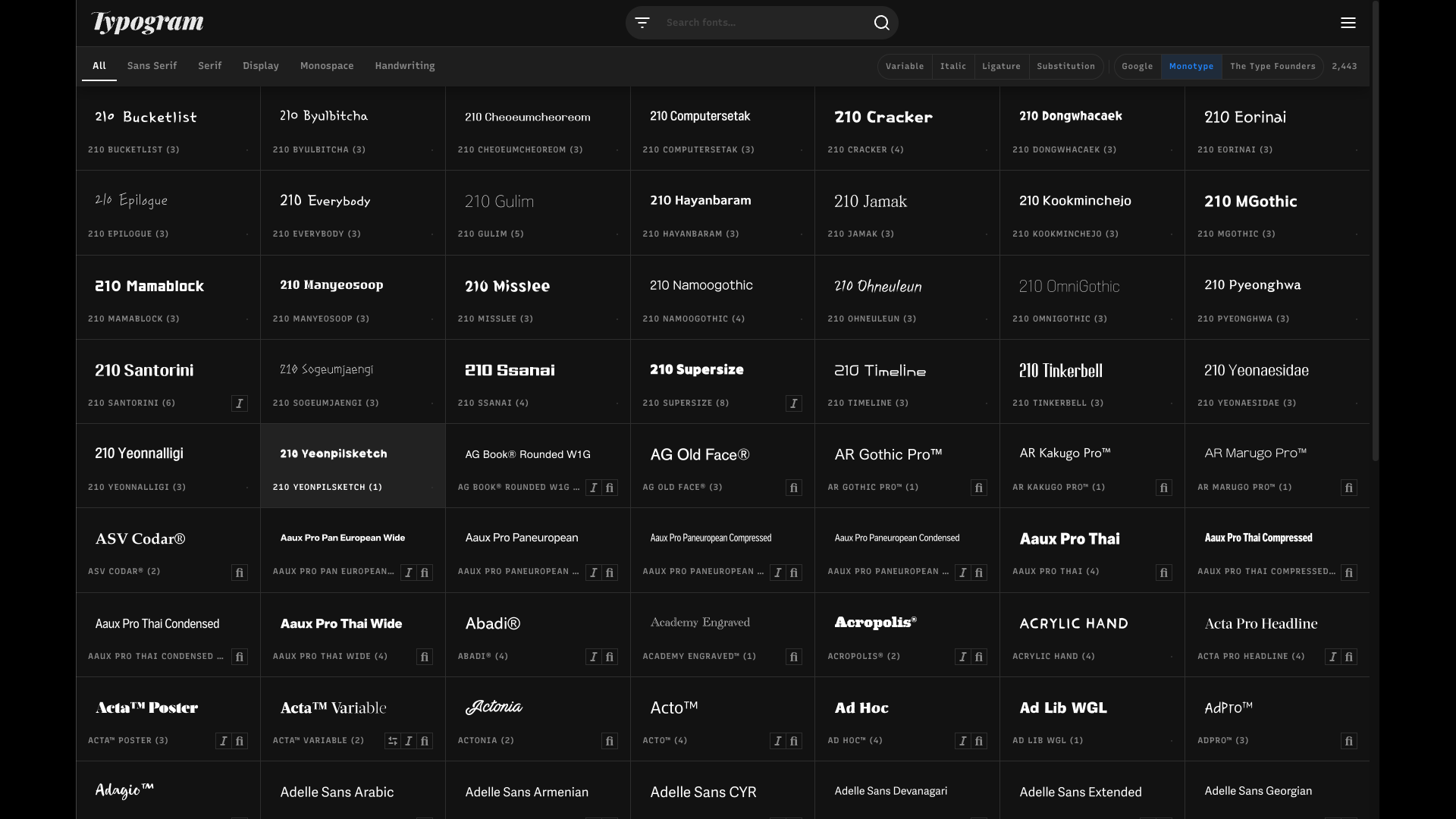
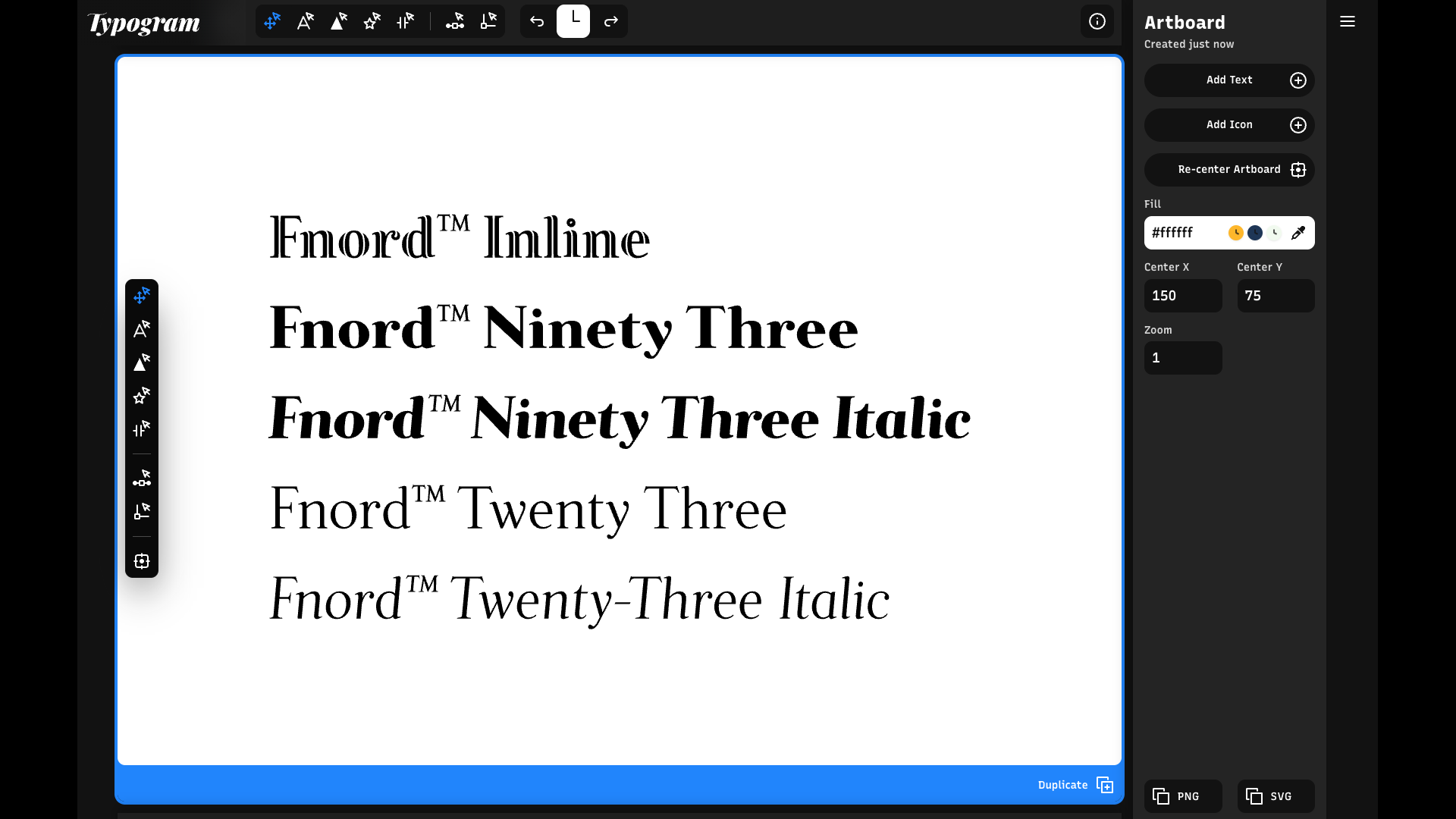
Wenting Zhang: I think putting all these awesome fonts in one place, not just Monotype fonts but also fonts from other places as well... putting everything together for you to choose, truly making a Disneyland for font lovers.
You know, font choice is not a limitation anymore. Anything that you can think of that could fit your vibe is at your fingertip at font m- in the font menu. It has, it's packed with filters and, and personality filters. That's why it's not just the classic, you know, classifications, and we also have a special toggle for ligatures and has ligature or has substitution, which works in a very funky way. It's based on what you, what text you're selecting, and we are filtering fonts that has ligature applicable to your text. So for example, my name's Wenting, and maybe there are fonts that has ligature for ST, but my name doesn't have ST in it. My name is, you know, maybe TI, maybe NG. It will find fonts that has TI or IN or NG ligature in that font, and we have an interface to surface them really quickly.
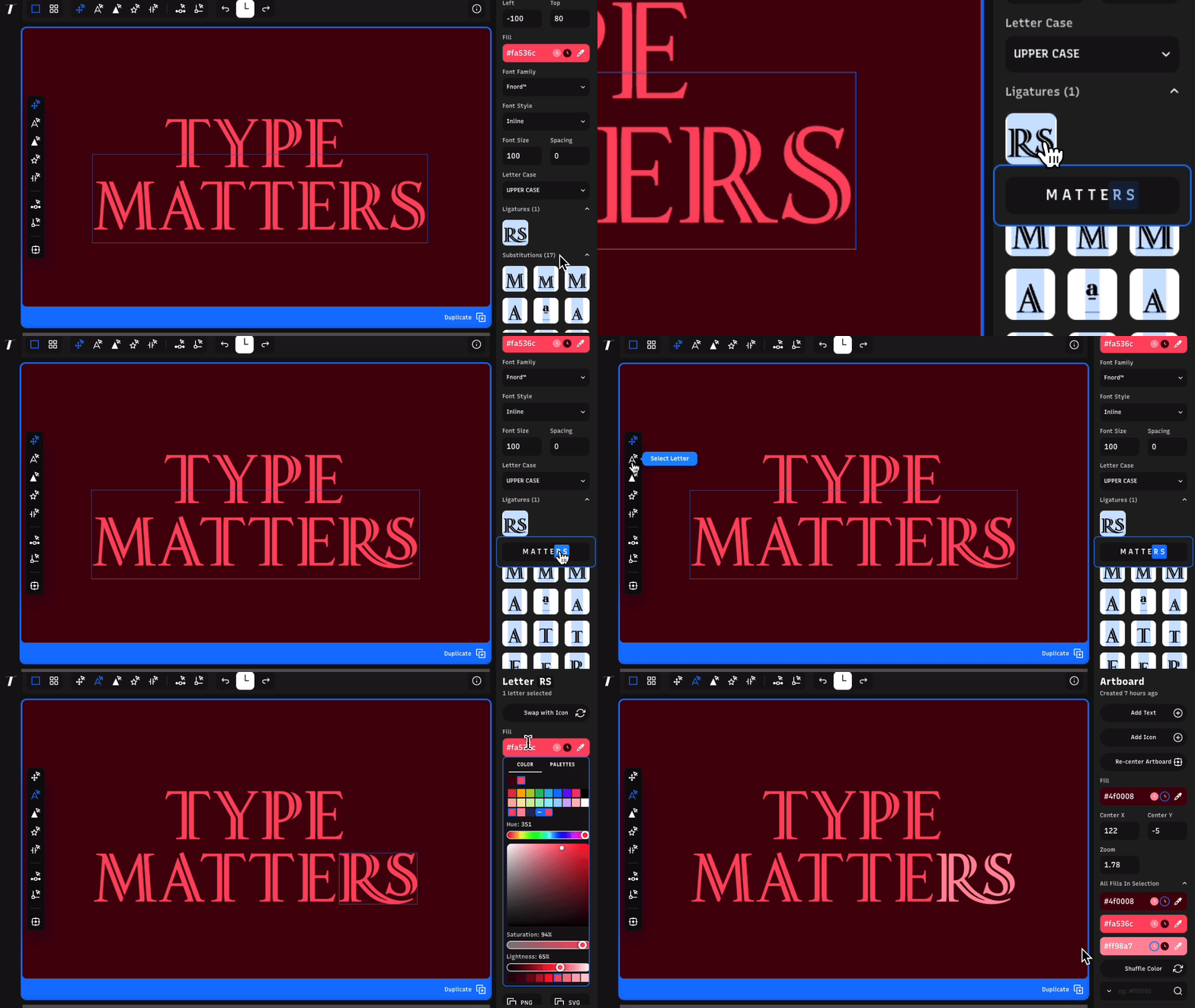
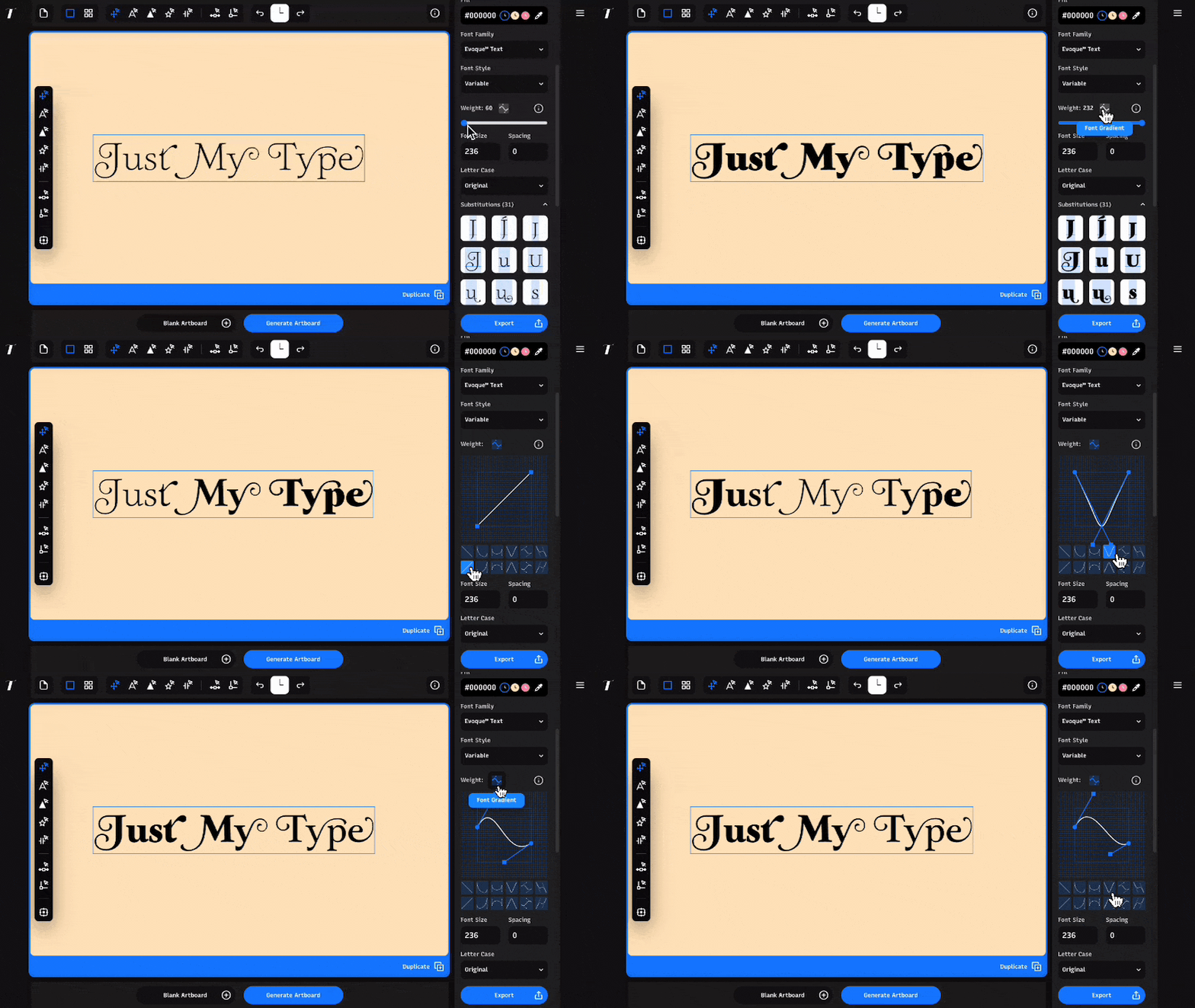
Similarly, has substitution work similar way where we want a font that has substitution for W because I want my monogram to be a very swishy W, not the normal W that everybody else get. So that brings up another big thing about Typogram Studio, is that not only we have all the fonts, we have all the features of that font. A font in a software A may look and feel and use in a different way in software B because the hidden gem of that font may be exposed a little bit better in a different software, and I want to s- come out and say that Typogram Studio have the most fullest set of features for that font. If that font has a alternates, if it's hidden in some other software where, you know, a few level of menu deep down, that's not the case in Typogram. And also, we support variable fonts. We also support shaping other features, including AI features, to support typography, really put typography front and center but also have the support system around it.
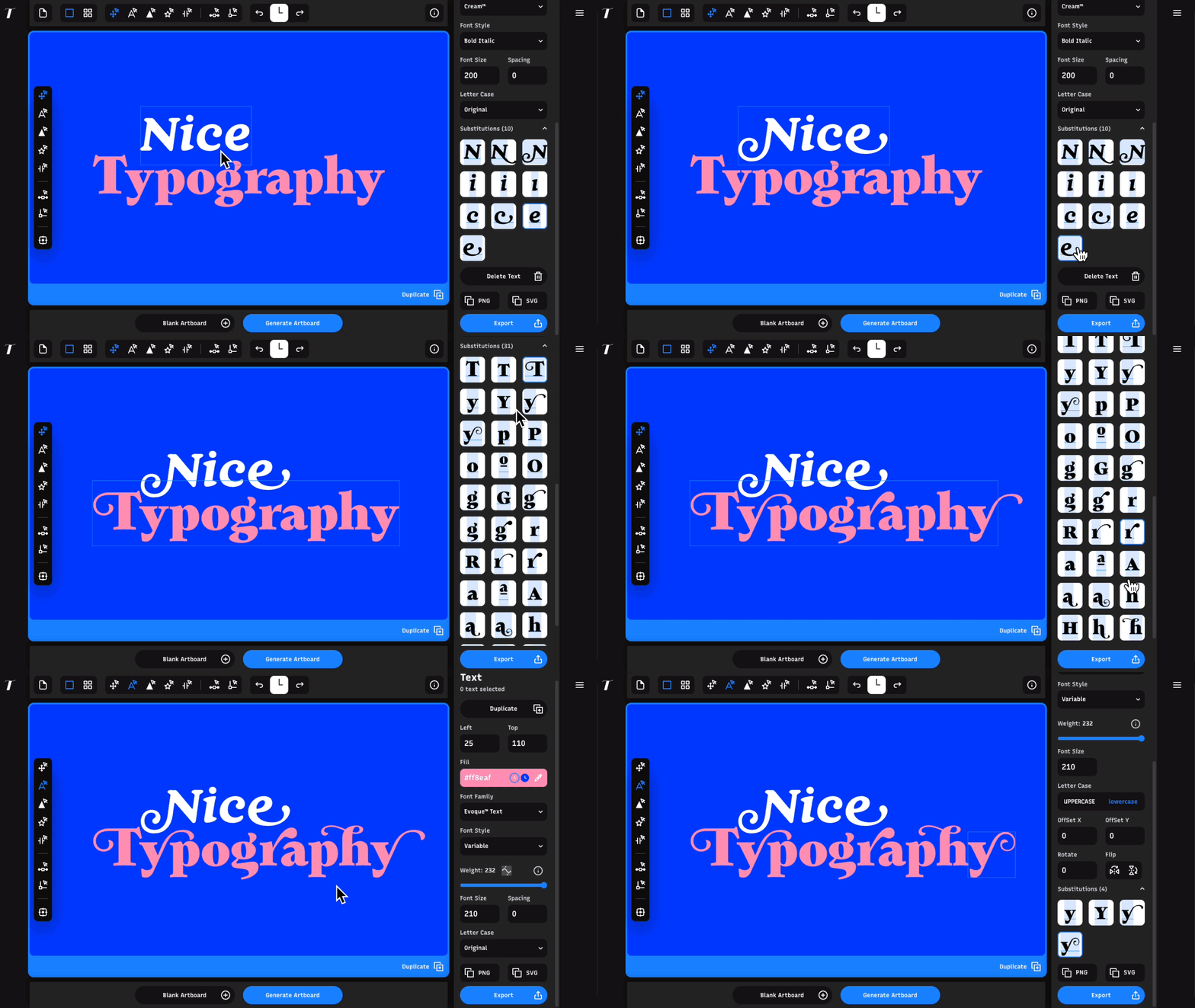
Wenting Zhang: And interestingly, I think the people who love Typogram the most is the type makers. People who made the typefaces feel seen because maybe they spent hours and hours on the alternative A and alternative, you know, ST ligature, and because of the tool, it was never seen, it was never used, and it was never kind of being spotted in the real world. But in Typogram, all that work is seeing the light of the day, and it's getting that spotlight.
Hua Shu: Oh, well, I was gonna say, I'm always really appreciative and really impressed if somebody who is not a designer made logos and then later share it with me for a design critique or something, because even though they're not designers, some of the things that people handcraft, DIY with our brand design tool is, is truly impressive. I think it's because they are able to at least do a good job of finding an appropriate typeface for their brand, and then also design a brand with a sense of intention in mind, which is something that is stressed a lot when you, when you study design and then learn about brand identity. So that's always something I'm, I'm really, really impressed by when people share their, whatever they made with Typogram and then also their ideas with me and [laughs] try to get a design critique or something. So yeah, that's something I really enjoyed out of building the design tool. And then in terms of Typogram Studio, people are always, whenever they see those, like, kind of the hidden gems of a certain typeface, like the ligature or the alternate characters, they are... Well, first of all, they're always surprised, and then they're just really impressed that you could actually have different variations of letters. For non-designers, of course, some of them try Typogram Studio, they're impressed by that because they didn't know. But then surprisingly, many designers didn't know either. So I think it's that aspect of uncovering almost like a typeface to them that really left an impression in them and makes them enjoy typography more in a way.
Hua Shu: Yeah, I always want to kind of using Typogram as a tool to tell people or giving people the impression of three principles of typography: simple, appropriate, and unique. And those are like a three ladders to climb. And, but Typogram gives them a set of tools that doesn't wander, because there's different way to be unique, and it's hard to be appropriate, and it's actually maybe the hardest to be simple. So Typogram first started with choosing fonts, and that's the simplest way to get your message across. A lot of people think, "Okay, maybe I need to use some kind of icon. Maybe I need some color or, or graphics." No, the simplest thing is to put what you want to say as text so people can read it. It's simple. You apply a font to it. That's the foundation of simpleness, and you choose a font that is appropriate to your message. If you are trying to tell a message to a k-kindergartner kids, choose a font that's playful and joyful and fun. If you're choosing a, a font to maybe a banking client, choose a font that's trustworthy, that is full of wisdom, that comes with prestige.
Wenting Zhang: That's appropriateness. You choose a font that fit in the vibe, and Typogram walks you through on choosing that in font menu and also in a lot of different educational content. And lastly was what Typogram shines as unique, how to be unique with typography. Well, there's one key way to do it. You can stretch a type, you can add color in obscure ways, you can add gradient, you can add drop shadow. There's different way to mistreat [laughs] a type. But then there's also a safe boundary of the font, but in a different font drawer that has those ligatures and, and, and alternative glyph, they are safe to be unique. Choosing them give you a safe passage to be both unique, and someone spent hours and days working on those ligatures, and it's not often in use. When you turn on that ligature, ST or my name, TI, that gives an impression. That gives a memory point that, oh, that's a little different. But that differentness is controlled, it's designed, it's refined. It's not wonky.
Wenting Zhang: Yeah, that's, that's a really key point that I think Typogram, the branding aspect of Typogram is trying to solve, is that the throwaways, the wasteland of logos where people start off not knowing what to do, and they start off with a crappy one or a temporary one to just to get something started. But all that time and all that exposure of that crappy brand is thrown away. It's not garnering impression. It's not garnering loyalty or, or recognition. And one day you have the budget, that work is chucked, and you start with something brand new, have nothing to do, no inheritance between that, the old one and the new one, and that's brand value lost. Brand value is really hard to measure or quantify, but it is huge. And okay, maybe you think, "Oh, my brand is so small, it doesn't worth much." But there's value in people who look at your logo on day one, and a year later, maybe your, your logo evolved, but they recognize you at first glance because even though it has changed, even though it evolved a bunch, it was not lost. So I think Typogram is really trying to solve that problem by giving you a really good starting point, but also giving you access throughout your journey to go back and revision instead of kind of, "Oh, I lost the source file. Oh, I can't have access to, you know, the editability version of that logo, so..." Or, "I didn't like that logo to begin with. Let's start anew with a different designer."
On Entrepreneurship
Dan Rhatigan: So how is it working on the business side so far? How's the entrepreneurship angle of Typogram going?
Wenting Zhang: I'm super excited, actually. And kind of going back to AI, I think when Hua and I started doing Typogram five, six years ago, it was before AI really boomed and really kind of started empowering the coding aspect of things, and it was really hard. And, you know, we're both designers starting a s- design software business. Even though we have domain expertise, but running a business requires more skill than the core design, even though the core business is design, but then there's surrounding, like there's filing taxes. We filed our corporate taxes not long ago. And there's also recruiting user testers, writing the code, talking to customers. That are skills we didn't have when we started, so we kind of divide and conquer. I become the design engineer of Typogram, and Hua become the design, and marketing, and business, and sales of Typogram, and we, we become this two-person machine to try to cover all fronts.
Hua Shu: Yeah, totally. I mean, you... For one, you know, if you're sending some kind of marketing email or communication, you no longer have to start from scratch. Now I just use my skill that I made in, in whatever AI I'm using, and they all, like, draft me an email pretty quickly, and then I can go and edit it and things like that. So yeah, definitely a lot more help before. Also, if there's, like, a specific type of user I'm interested in or, like, a community I'm interested in, I can use AI to do some research. So it feels less like you need to do everything from zero every time. Now it kind of feels like you can do everything from zero to five. But wearing a lot of different hats, it's still really overwhelming. But certainly, it's, it's easier than it was before. And then- Wenting talked a little bit about when we started, like we have to find our own users, run user testing workshop. And the funny story about that is at that stage, essentially we had to make very, very manual like mock-ups and then like paper prototypes. Everything is very much like duct taped together, and we had to kind of figure it out all ourselves. And nowadays with AI, I believe that process can be speed up a lot faster, which is really exciting.
Wenting Zhang: And also going back to coding, 'cause I was a designer who can code before AI, but now I feel much more empowered. I have like this freedom that I've, I'd never felt before that I can code anything. And I think that present a great opportunity for designers who are like me and who are like Hua who want to start a business and couldn't because we can't really code a full-fledged product. Well, now is your chance. Now is your time. And I think AI presents both opportunities and challenges at the same time. And for designers, I think that scale might be leaning towards more positive than negative. Our special skill sets are not entirely replaced by AI. I think it's still on a at least safer side than programming or coding. And on the other side, coding become cheap. Design is not cheap yet, or it's not, not currently cheap, and we can combine that and we can create so much value as an entrepreneur. So I want to just give a shout-out to people who are on the fence. Like if you're a designer, you want to create things, and if you want to start your own business creating software or creating tools and creating anything, now is a really good window of time to, to pursue that because we are so uniquely positioned that our skill set and also the advancement of the technology really aligned to, to give us all the tools and power to pursue what we wanted. Designers oftentimes are the people who have the most ideas. A lot of designer I know have idea books that for a rainy day we're gonna work on this or that. Well, now is the time to pull that book and then start working, become entrepreneurs. Entrepreneurship is not for everybody. If it is for you, I think there's no better time to pursue it.
Closing
Dan Rhatigan: I think that is a beautiful thought to end all of this on because you two are-- You've started on a really, really cool and fun journey, and it's awesome to hear about how much is going into that and how much you're giving back for other people to make and do themselves. Um, so thank you for taking the time to talk to us today. I really enjoyed it. I hope it was fun for you.